

Technology training made easy
Now all the quality IT training courseware you need is available from a single source. Purchase a license to the Pearson Skilling Suite and you’ll gain access to our catalog of over 60 high-demand technology courses and administrative tools that help you:
- Track enrollments
- Assign instructors
- Manage license inventory
- Monitor learner progress in real-time
How it works
We'll assist you every step of the way, so you have the full power of the administrative tools in the Pearson Skilling Suite from the start. After you purchase your first license, you’ll receive access to key resources including QuickStart and user guides, an onboarding video, access to "office hours" for support, and more.
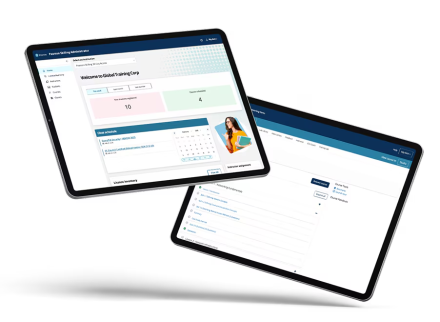
Once you're set up as an administrator, you'll be able to:




How to buy
Step 1
Purchase a license for Pearson courseware.
Step 2
Use the license to choose from over 60 courses in the Pearson Skilling Suite. Once you select your courseware, you'll have access to the administrative tools.
Step 3
You'll receive access to QuickStart and user guides, an onboarding video, and "office hours" for support, so you can set yourself up as an administrator.
Select courseware from high-demand technologies, with value you can only find at Pearson:
- Content designed to align with certification exams so learners are fully prepared for the test.
- Live, contextualized labs and practice tests included at no additional charge.
- An Exam Pass Pledge that provides a second testing opportunity for those who follow the certification preparation method.
- Cisco CCNP and CCIE Enterprise Core ENCOR (350-401 v1.1)
- Cisco Certified Network Associate CCNA (200-301 v1.1)
- Cisco Certified Support Technician CCST Cybersecurity (100-160)
- Cisco Certified Support Technician CCST Networking (100-150)
- Cisco Implementing and Operating Security Core Technologies SCOR (350-701 v1.1)
- CompTIA A+ Core 1 (220-1201)
- CompTIA A+ Core 2 (220-1202)
- CompTIA Advanced Security Practitioner CASP+ (CAS-004)
- CompTIA Cloud+ (CV0-004)
- CompTIA Cybersecurity Analyst CySA+ (CS0-003)
- CompTIA IT Fundamentals+ (FC0-U61)
- CompTIA Linux+ (XK0-005)
- CompTIA Network+ (N10-009)
- CompTIA PenTest+ (PT0-002)
- CompTIA Security+ (SY0-701)
- CompTIA SecurityX (CAS-005)
- Microsoft 365 Administrator (MS-102)
- Microsoft 365 Fundamentals (MS-900)
- Microsoft Administering Windows Server Hybrid Core Infrastructure (AZ-800)
- Microsoft Azure Administrator (AZ-104)
- Microsoft Azure AI Fundamentals (AI-900)
- Microsoft Azure Data Fundamentals (DP-900)
- Microsoft Azure Fundamentals (AZ-900)
- Microsoft Azure Security Technologies (AZ-500)
- Microsoft Configuring Windows Server Hybrid Advanced Services (AZ-801)
- Microsoft CyberSecurity Architect (SC-100)
- Microsoft Data Engineering on Azure (DP-203)
- Microsoft Designing and Implementing Azure Networking Solutions (AZ-700)
- Microsoft Designing and Implementing DevOps Solutions (AZ-400)
- Microsoft Designing Azure Infrastructure Solutions (AZ-305)
- Microsoft Developing Solutions for Azure (AZ-204)
- Microsoft Endpoint Administrator (MD-102)
- Microsoft Identity and Access Administrator (SC-300)
- Microsoft Power BI Data Analyst (PL-300)
- Microsoft Power Platform Fundamentals (PL-900)
- Microsoft Security, Compliance, and Identity Fundamentals (SC-900)
- Generative AI Fundamentals (CCS-100)
- IT Specialist Artificial Intelligence (INF-307)
- IT Specialist Cloud Computing (INF-104)
- IT Specialist Computational Thinking (INF-308)
- IT Specialist CyberSecurity (INF-105)
- IT Specialist Data Analytics (INF-202)
- IT Specialist Databases (INF-201)
- IT Specialist Device Configuration and Management (INF-103)
- IT Specialist HTML and CSS (INF-301)
- IT Specialist HTML5 Application Development (INF-306)
- IT Specialist Java (INF-304)
- IT Specialist JavaScript (INF-302)
- IT Specialist Network Security (INF-102)
- IT Specialist Networking (INF-101)
- IT Specialist Python (INF-303)
- IT Specialist Software Development (INF-305)
Want to take it for a test drive?
Access the self-guided demo to see the administrator, instructor and student experiences.
Take self-guided demoWant to take it for a test drive?
Frequently Asked Questions
Get answers to some of the most common questions about the Pearson Skilling Suite.
The Pearson Skilling Suite integrates everything learners need to build real-world IT skills and prepare for certification—while giving instructors and administrators the tools to manage training at scale.
Each license includes:
- Access to Pearson Skilling Suite courseware
- Entry to a full catalog of 60+ high-demand IT courses
- Hands-on labs (when appropriate), videos, eBooks, and MeasureUp practice tests
- Instructor dashboards and reporting tools
- Administrative tools for class and license management
- Eligibility for Pearson's Exam Pass Pledge
It's a turnkey solution designed for corporations, workforce development programs, higher education, and training centers.
Courseware is aligned to leading certification providers including AWS, Microsoft, CompTIA, and more.
Depending on the course, learners receive:
- Hands-on live labs and simulations
- Training videos and eBooks
- MeasureUp practice tests
- Certification-aligned content mapped to exam objectives
Not every course requires a live lab. When hands-on practice is essential, a lab or simulation is included.
Practice tests prepare learners for real certification exams with robust, exam-aligned content.
Each practice test includes:
- Approximately 150 questions aligned to exam objective domains
- Practice Mode: Explanations and references to reinforce learning
- Certification Mode: Timed, no explanations—mirrors the real exam experience
Practice tests must be taken on a computer to ensure the best testing experience.
How to launch a practice test:
- Navigate to the Course tab
- Expand the Table of Contents
- Select Practice Exam
- Follow on-screen instructions to customize and launch the session
The Pearson Skilling Suite supports both Instructor-Led Training (ILT) and Self-Paced Learning.
Instructor-Led Training
Instructors have access to:
- Customizable PowerPoint decks
- Live lab monitoring and performance insights
- Practice test reporting
- Supplemental text and video content
Self-Paced Learning
Learners can progress at their own pace with access to:
- Full course content
- Live labs (when applicable)
- Practice tests
- Video and text-based instruction
Designed for scale and simplicity, the platform allows organizations to:
IAdministrators can:
- Track enrollments and license usage
- View License Inventory
- Create classes and assign multiple instructors
- Enroll or unenroll learners
- Monitor learner progress in real time
- Purchase additional licenses as needed
Instructors can:
- Access assigned classes via their Profile or Classes tab
- Use gradebooks and course reporting
- Monitor lab performance
- Review practice test reports
Account Setup
- Visit skilling.pearsonvue.com
- Register using a valid email address
- Verify your email via the link from [email protected]
LMS Integration
The Pearson Skilling Suite integrates with LTI 1.3-compliant Learning Management Systems, enabling delivery within your existing LMS environment.
System Requirements
- Supported devices: Desktop, laptop, tablet, smartphone
- Browsers: Latest versions of Chrome, Firefox, Safari, and Edge
- Internet: Reliable connection recommended (minimum 5 Mbps / 800 kbps)
- Practice tests must be taken on a computer

HOW CAN WE HELP?
Contact us
Whether you're a training center, enterprise, or academic institution, our team is here to help. Explore tailored solutions, get product support, or learn how Pearson can help you deliver successful training and certification programs.
Let's connect